
Choose a design before you sign up
Real Estate Postcard Templates & Examples
Browse listing, sale, farming, and open house postcard examples. Create a free account to personalize a template with your photos and branding.
Postcards: $1.04 each
Printing, postage, and mailing included per postcard. Purchased lists and custom design services cost extra.
- Customize templates with your branding
- Upload your own list or build a neighborhood list
- Printing, postage, and mailing included for postcards

Browse Templates by What You Want to Say
Each card opens a public product gallery with more designs and details. These are visual examples; create an account to edit a template. Choose the message first, then adapt the photos, wording, and branding to your audience.





What to Change Before You Mail a Template
For a listing or sale
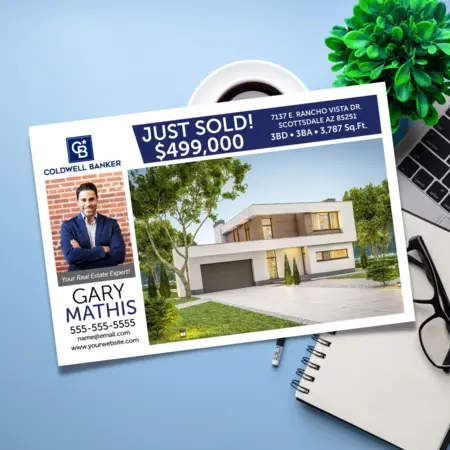
Use an accurate property photo, address, and transaction details. A Just Listed card can invite readers to view the listing; a Just Sold card can invite a conversation about a nearby home. Use claims and photos you have permission to publish.
For a neighborhood campaign
Choose a recognizable layout and keep your logo, colors, and contact details consistent. On market updates, label the area and date range so readers understand what the figures describe. Change the message as the neighborhood changes.
For the next step
Give each card one clear action: call you, view a listing, attend an open house, or request a home valuation. Check the front and back, photo quality, phone number, and any QR-code destination in the preview before placing your order.
From Example to Personalized Postcard
Find your campaign type
Browse the public examples above. Choose a listing, sale, farming, event, or follow-up design that matches the reason for mailing.
Make the template yours
Create a free account and customize a template in PowerDesigner. Add your own photos, logo, contact details, and wording, then preview both sides.
Review your mailing
Choose recipients, check the design and order total, and submit when ready. Wise Pelican prints and mails the cards; mailing list purchases have a separate cost.
Frequently Asked Questions
Creating an account and customizing templates in PowerDesigner is free. You pay when you order printed and mailed postcards. Purchased mailing lists and optional custom design services are separate charges.
Yes. This gallery and its linked product pages are public. An account is needed to open the editing tools and customize a template for an order.
The images on this page are examples of designs you can customize in Wise Pelican. This gallery does not provide editable PDF, Canva, or Word downloads. Create a free account to personalize a design in PowerDesigner.
The postcard mailing service shown here uses full-color 6″ × 9″ postcards. Check the front and back in the editor before ordering, including the space reserved for addressing and postage.
Yes. Wise Pelican supports uploading your own postcard design. Check the current artwork requirements in your account and review the proof before ordering. If you want printed cards shipped to you instead of mailed to recipients, choose Print & Ship.
Choose a Template and Make It Your Own
Explore the designs first, then create your free account to customize a postcard and review your mailing. No minimum postcard order quantity.
Create Your Free Account